Features

Everything between the time clock and the invoice

Mayora brings together time tracking, shift planning, requests, surcharges and invoices – following the rules that apply to businesses in Germany. Every legal duty is included on every plan; features marked “Add-on” can be booked when you need them.

Recording time

Your team clocks in the way that suits the work.

Time clock by app, browser or kiosk tablet

Clock in and out, breaks and the current task – on the phone, in the browser or at a shared tablet.

  • Night shifts count as one shift: they belong to the day they start – for hours, breaks, overtime and the payroll export.
  • For a billable task, the client is recorded along with it (with the Clients & invoicing add-on).
  • When clocking out, Mayora shows the day's work log with breaks.
  • Corrections delete nothing: the old punch is marked void and stays traceable.
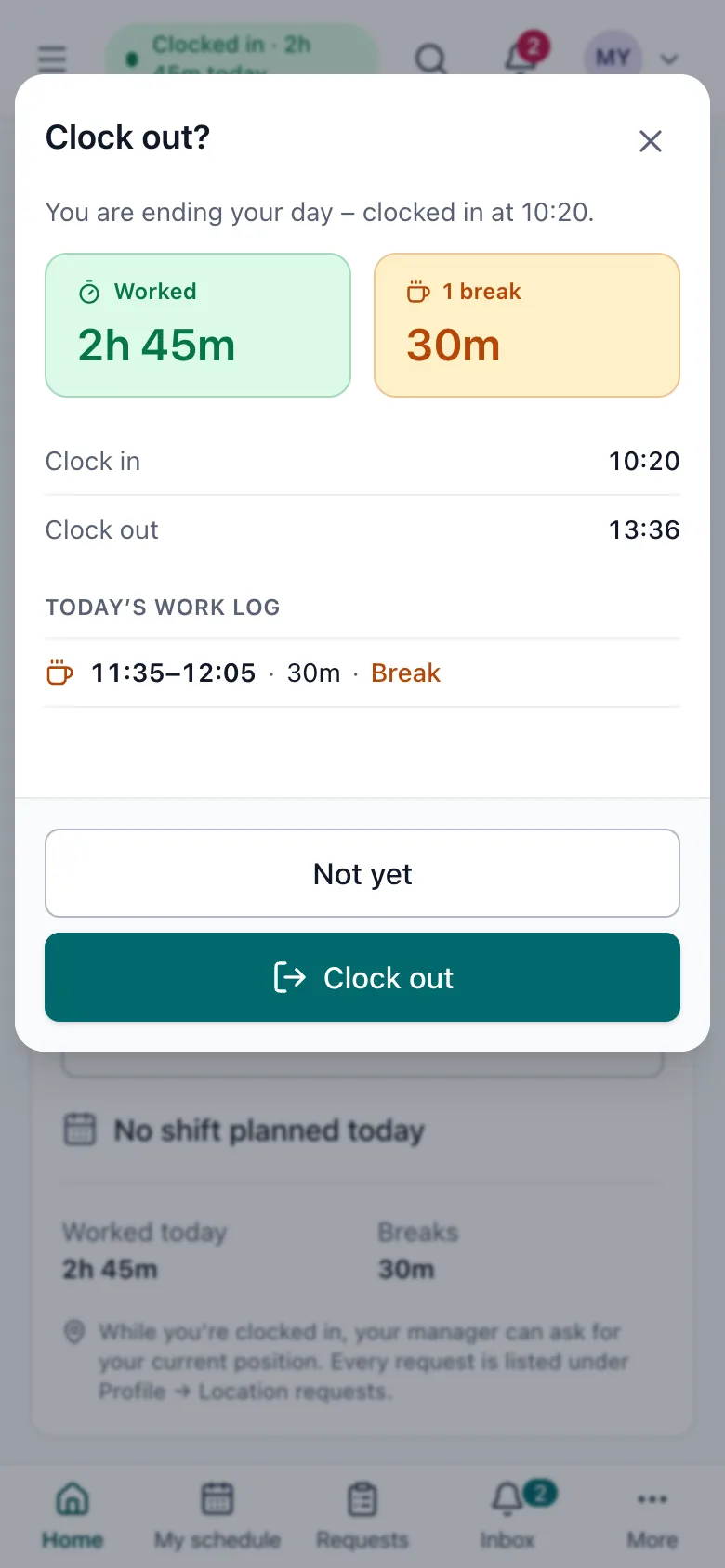
Clocking out on a phone: time worked, break and the day's work log.
Sample data

Kiosk tablet for everyone without a phone Add-on

A tablet at the entrance, in the break room or in the warehouse becomes the time clock. You pair it once with a code from the portal.

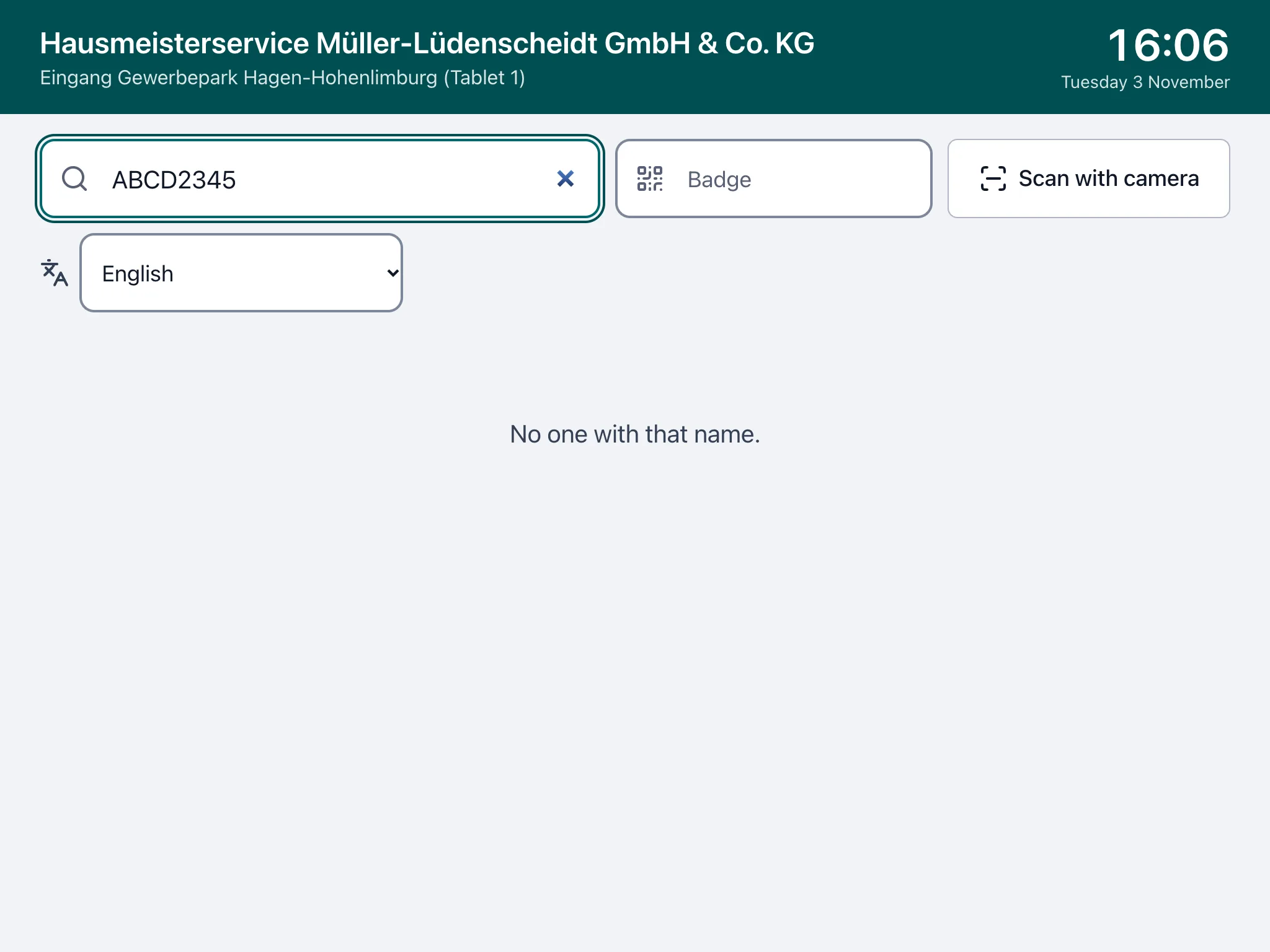
  • Tap your name or scan your badge, then enter your personal PIN (4–6 digits).
  • After 5 wrong PINs the person is locked for 15 minutes and their manager is told.
  • No fingerprints, no face recognition.
  • Works offline: the tablet stores punches and sends them once the connection is back.
  • A kiosk doesn't use a seat on your plan; kiosk punches are marked as such.
  • 1 to 20 kiosk tablets, depending on the plan.
Kiosk tablet: tiles with the team's names and status – working, on a break, not clocked in.
Sample data

Clocking in offline

In a basement, in the countryside, without signal: punches are saved on the device and sent later.

  • The time of the punch counts – if it is plausible (in order, at most 72 hours old).
  • Differences of more than 10 minutes are flagged and shown to the manager.

Location: three clear options Add-on

You decide whether and how Mayora uses location. The setting is always visible to your staff.

  • No location (the default).
  • Location on request: only while the person is clocked in, with a reason, at most every 15 minutes and 8 times a day. Every request is listed in the person's profile.
  • Only at accepted sites: clocking in only works inside a defined site; the server checks it again.
  • Positions and requests are deleted after 90 days. There is no covert tracking. With a works council, agree the option first.

Working time, surcharges and minimum wage

The rules of the Working Hours Act, the Income Tax Act and the Minimum Wage Act are built in.

Breaks, the 10-hour limit and rest periods

Mayora applies the limits of the Working Hours Act automatically.

  • Mandatory breaks under § 4 ArbZG (30 minutes after 6 hours, 45 minutes after 9 hours): if a break is missing, Mayora adds it automatically and announces it 15 minutes ahead.
  • At 10 hours of work, the person is clocked out automatically (§ 3 ArbZG); a warning comes 15 minutes before, and the manager is told.
  • An 11-hour rest period (§ 5 ArbZG): clocking in too early raises an alert to the managers. A shift that breaks the rest period is only saved if the manager confirms a lawful exception – and that is logged.

Night, Sunday and holiday surcharges

The hours per surcharge type are calculated from the punches – including across midnight and the clock changes. You switch surcharges on in the settings; the defaults are the tax-free rates of § 3b EStG, which you can change, e.g. for a collective agreement.

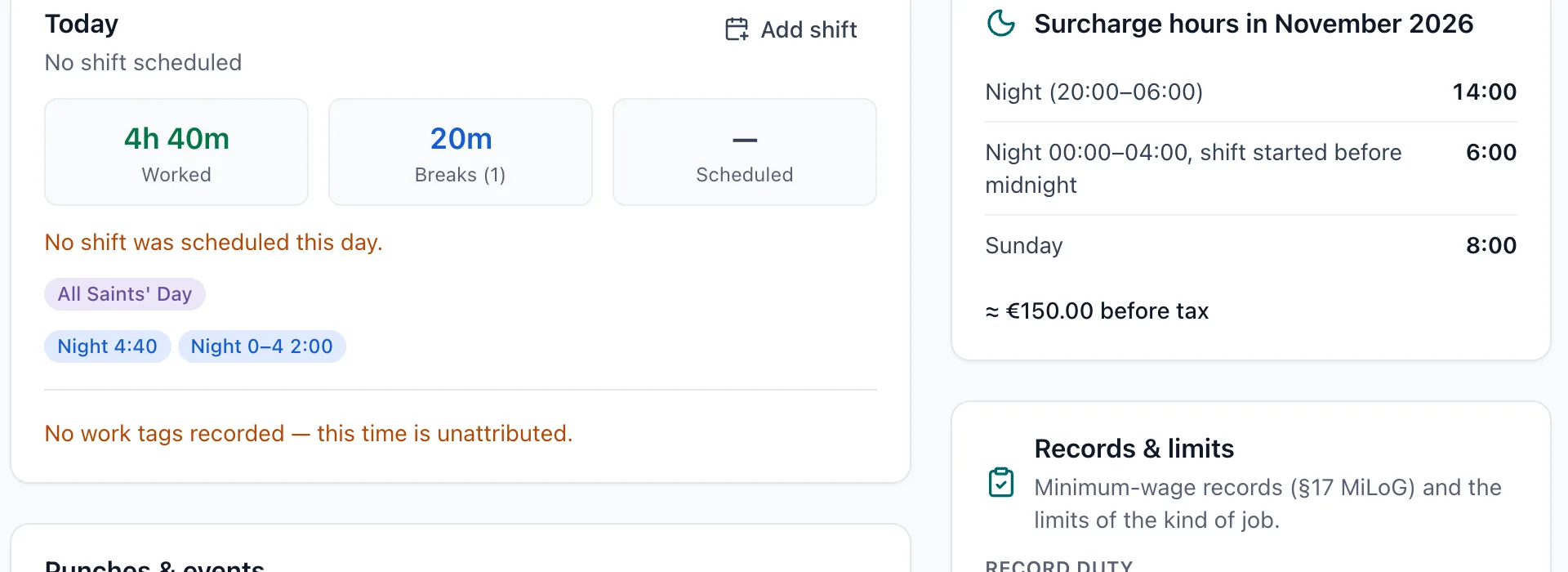
  • Night 20:00–06:00: 25 %; 00:00–04:00 if the work started before midnight: 40 %.
  • Sunday: 50 %. Public holidays and 31 Dec from 14:00: 125 %. 24 Dec from 14:00, 25/26 Dec and 1 May: 150 %.
  • Public holidays for all 16 federal states; local holidays can be added.
  • Mayora records and exports the hours. Your payroll provider applies tax and social insurance.
Day view of a night shift with surcharge chips (holiday, night, night 00–04) and the month's surcharge hours.
Sample data

Minimum-wage records under § 17 MiLoG

Where the law requires it (§ 2a SchwarzArbG), and for every minijob, start, end and duration of work must be recorded within 7 days. Mayora takes care of it.

  • A daily completeness check: missing clock-outs and planned shifts without hours are flagged from day 2 to day 6 – to the person and their managers.
  • An export for customs inspections (FKS) as PDF and CSV, one line per shift; corrections and automatic clock-outs are marked.
  • Contracts below the minimum wage are refused unless a § 22 MiLoG exemption is stated.
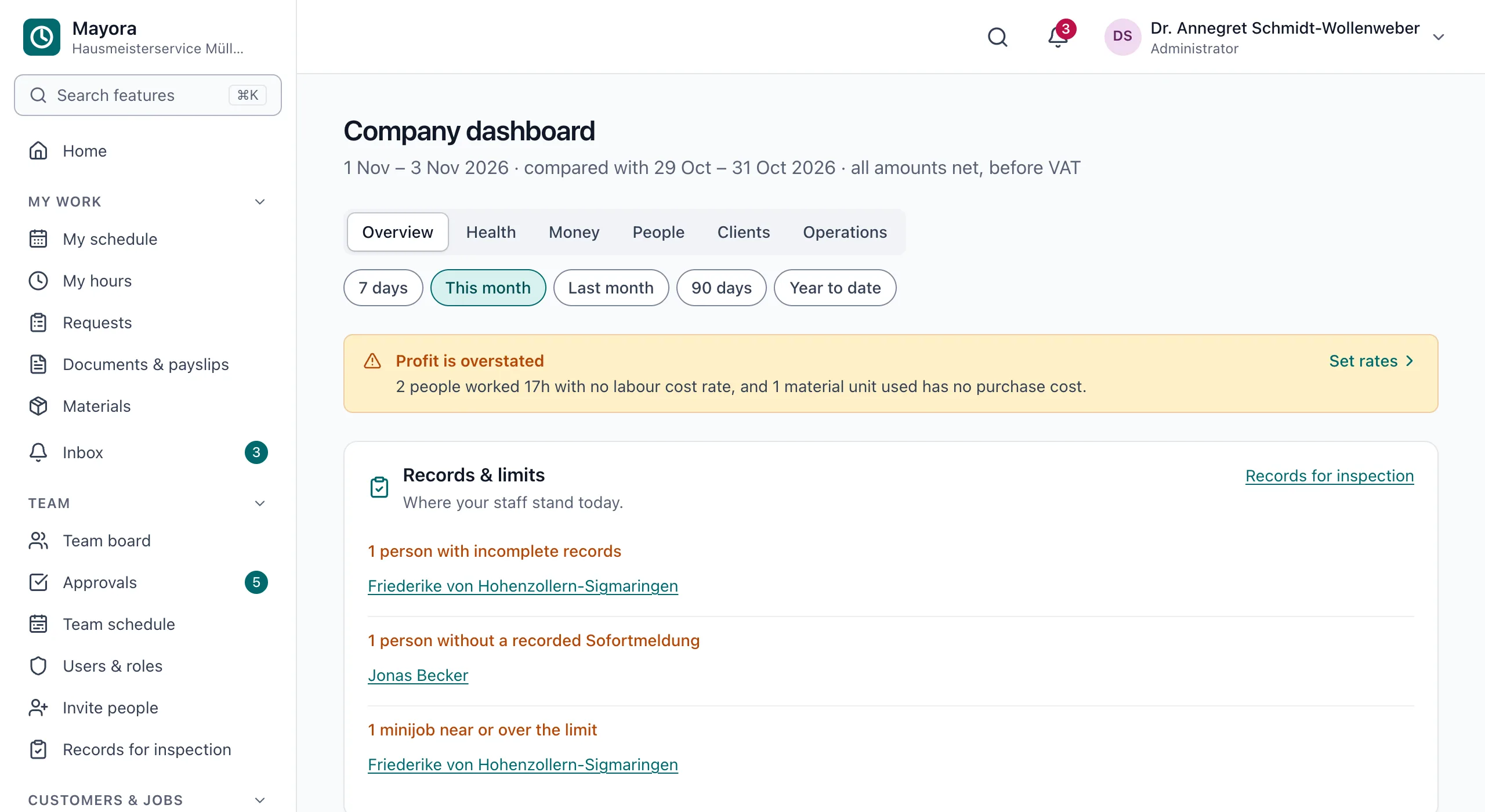
  • Limits in view: minijob €603 a month (2026; €633 from 2027), short-term work at most 70 days a year, working students over 20 hours a week. Mayora points out when a limit is crossed – for minijobs before the limit is reached.
Company dashboard with the “Records & limits” panel: an incomplete record, a missing immediate registration, a minijob near the limit.
Sample data

Planning and requests

Shift planning with night shifts and swaps

Plan the week per team and person. Staff see their schedule in the app.

  • Night shifts such as 22:00–06:00 can be planned directly.
  • The rest period is checked while planning.
  • Staff request shift swaps in the app; the manager approves.

Requests with the four-eyes principle

Holiday, sick notes, time corrections and shift swaps go through the app – with a reason and a history.

  • Holiday also as a half day. Managers can also enter absences for their team.
  • Annual leave per person: the days in the contract, with part-time and joining-year shares suggested, never below the legal minimum (§ 3 BUrlG). Remaining days move into the new year – optionally lapsing on 31 March, after Mayora has told each person in time.
  • Sick leave has no allowance – German law has no sick-day budget. From the 4th day of sickness, Mayora reminds about the sick note (§ 5 EFZG).
  • Anyone who falls sick during their holiday gets the holiday days back (§ 9 BUrlG).
  • Nobody approves their own request – except in a company with only one administrator.
  • Managers see and decide only requests from their own teams.

Clients, invoices and accounting

For businesses that bill work to clients or manage materials and equipment. These features are add-ons – you book only what you need. The payroll hours export is included on every paid plan.

Clients, tasks and invoices under § 14 UStG Add-on

Tasks are billable or internal. A client's billable time and approved materials become the invoice.

  • Every field required by § 14 UStG, with net, VAT and gross.
  • VAT per client: 19 %, 7 %, EU reverse charge, § 13b UStG or exempt; the small-business note under § 19 UStG.
  • Gap-free numbers: the number is assigned when the invoice is issued; drafts have none.
  • Issued invoices are never changed; corrections are made with a cancellation invoice with its own number.
  • PDF, and a sales journal as CSV for your tax advisor.
  • Clients & invoicing add-on: clients, billable tasks, invoices and their DATEV booking export.
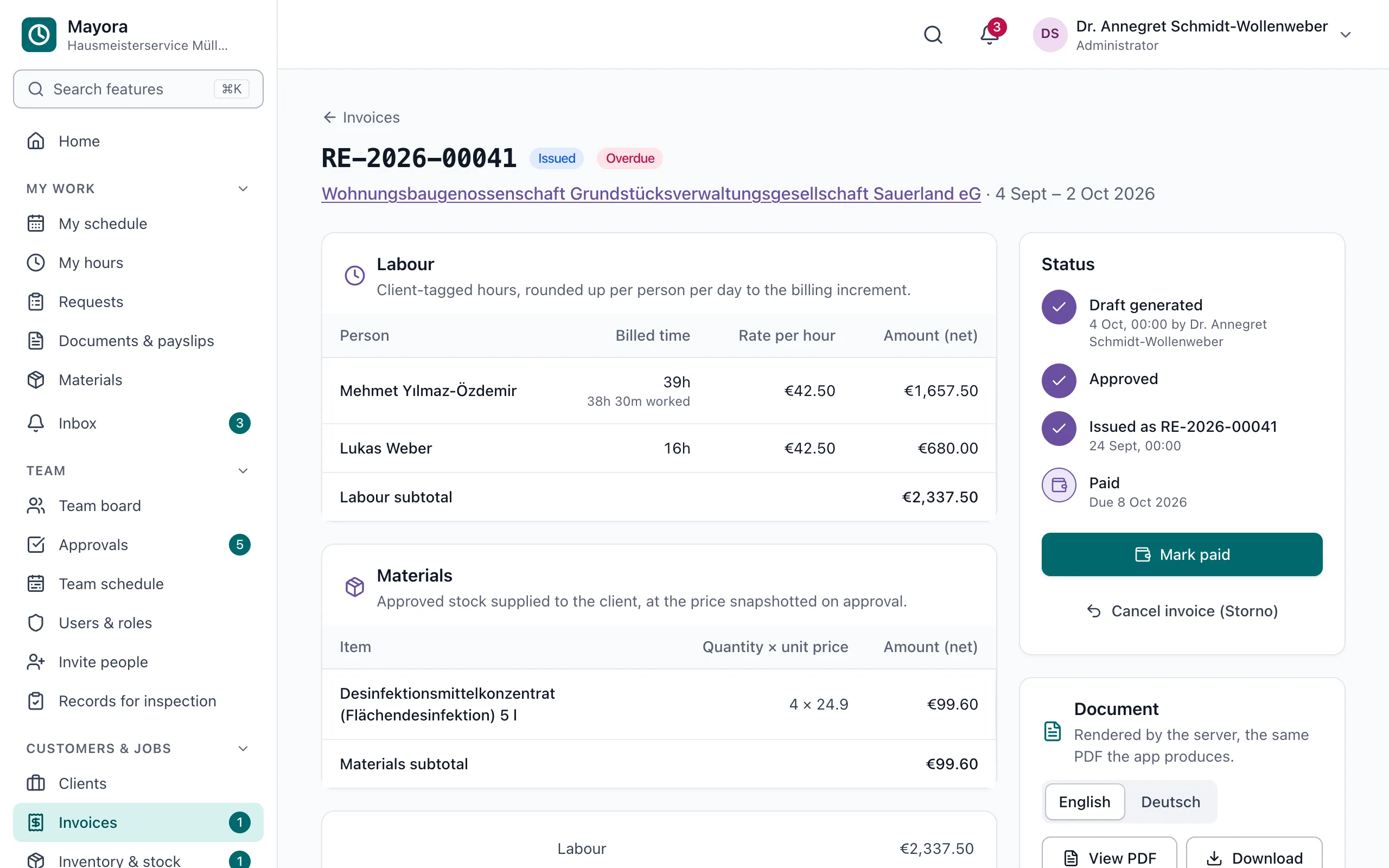
An issued invoice in the browser: working time per person, materials and the status from draft to paid.
Sample data

Materials, stock, company equipment and expenses Add-ons

What is used or spent on the job ends up in the right place.

  • Materials & stock: items and stock levels; staff report materials used for a client, the manager approves, and the invoice uses the price on the day of approval.
  • Company equipment: tools, vehicles, laptops, keys – who has what, with handover and an acknowledgement of receipt. Each handover records the condition and the mileage or hours reading.
  • Damage reports: whoever has a vehicle or device – or had it last – reports damage with a description and up to 4 photos. The manager is told at once and tracks the repair until it is done; the history shows who had the item and when.
  • Expenses with a VAT rate (19 %, 7 % or 0 %) and net, tax and gross amounts.
  • Materials & stock, company equipment and expenses are three separate add-ons.

DATEV booking export and payroll hours Beta

You download files that your tax advisor imports into DATEV. No contract with DATEV is needed for this.

  • DATEV booking batch (EXTF) for invoices, cancellations and expenses – with the Clients & invoicing or Expenses add-on.
  • No double bookings: if your tax advisor books the bank statements (the usual case), Mayora leaves payments out and books expenses via the money-in-transit account. If you prefer, Mayora books payments received too.
  • Payroll hours per person and month as a LODAS import file or CSV: hours, overtime, holiday, sick and unpaid days. LODAS on every paid plan, CSV on the free plan too.
  • Beta: the files have not yet been imported into a real DATEV system. Check them with your tax advisor first.
  • Mayora does not run payroll. Wage tax and social insurance stay in your payroll software.

For your team

Simple mode with one big button

For everyone who just wants to clock in: one big button to clock in and out, the current task, today's hours and the next shift.

  • Requests as three big tiles: holiday, sick, fix my hours.
  • You can make it the default for all staff; each person can switch it off.

7 languages for staff

Each person chooses their own language: German, English, Turkish, Polish, Romanian, Italian or Bosnian/Croatian/Serbian.

  • Turkish, Polish, Romanian, Italian and Bosnian/Croatian/Serbian are early translations and may contain mistakes.
  • The administration and finance screens are available in German and English; in the other languages they appear in English.

Try it with your team

6 weeks free, up to 15 people, no payment details. Afterwards, continue for free with up to 3 people – without add-ons or DATEV exports.

See pricing · Add-ons